

Using Calendly for scheduling student meetings

Using Calendly for Scheduling Student Meetings
By Kim Garvison and Alanna Prieditis
¡Hola! We’re Kim Garvison and Alanna Prieditis, and we teach all levels of Spanish for Michigan Virtual, from Level 1 through Advanced Placement.
One of the best ways to learn and speak a language is to practice doing just that (which might also explain why students in world language courses are expected to practice reading, writing, listening to and speaking the target language). As educators who have spent time in Spain, we can tell you that practicing the language in a conversational setting has the most valuable application in the real world.So in our classes, we work to practice language regularly.
But here’s the twist: we don’t teach in face-to-face classrooms, we’re working in online, asynchronous courses.
As is the case for many online educators, this presents some challenges. One of the biggest challenges? Regularly scheduling time to connect with each student in our course to listen to and assess their language development. We needed to find a tool that would eliminate the need for several back-and-forth communications to simply set up an appointment for each short assessment. We not only wanted a tool to help share available time slots for appointments but also one that would sync with our calendars.
That’s when we discovered Calendly.
https://youtu.be/ukDt2lGfwG4 While Calendly does have a premium version, we have found the free version to have all we need! Calendly allows you to set your availability for each day with varying time blocks. You can customize the length of the appointment slots as well. This calendar can be then be shared as a link or embedded into your online course or website for students to select a time slot. Once the student selects their time slot, an appointment is automatically added to your synced calendar. (We love that this feature makes students share the responsibility of scheduling.)While many scheduling tools sync with Google and other calendars, we needed something to specifically work with Outlook (Calendly does work with Google, iCloud and Office 365 email, too).
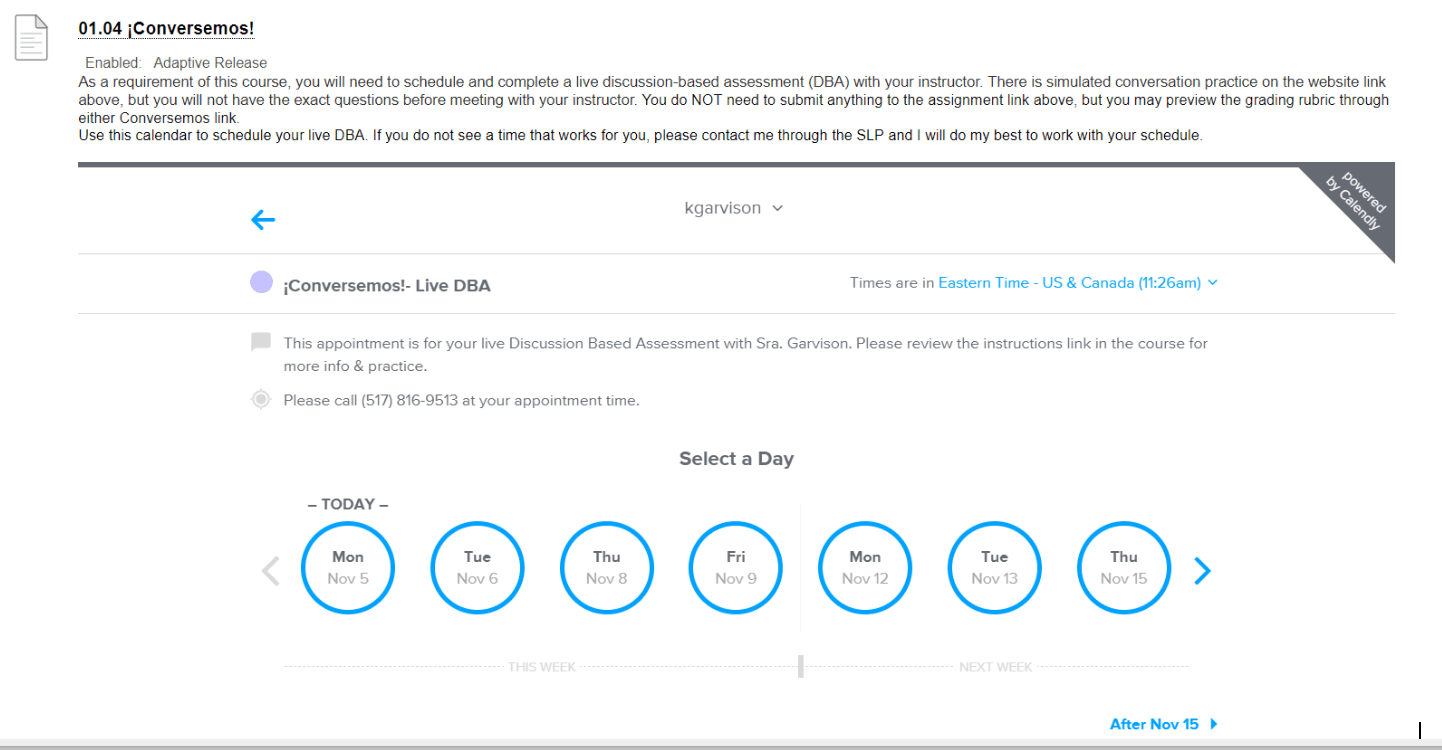
After finding Calendly and digging deeper into its capabilities, we found that you can also customize questions to ask students upon creating an appointment. This was super helpful for us because we wanted to add required areas to gather the student's name, email address, specific class, and the unit for which they are scheduling.
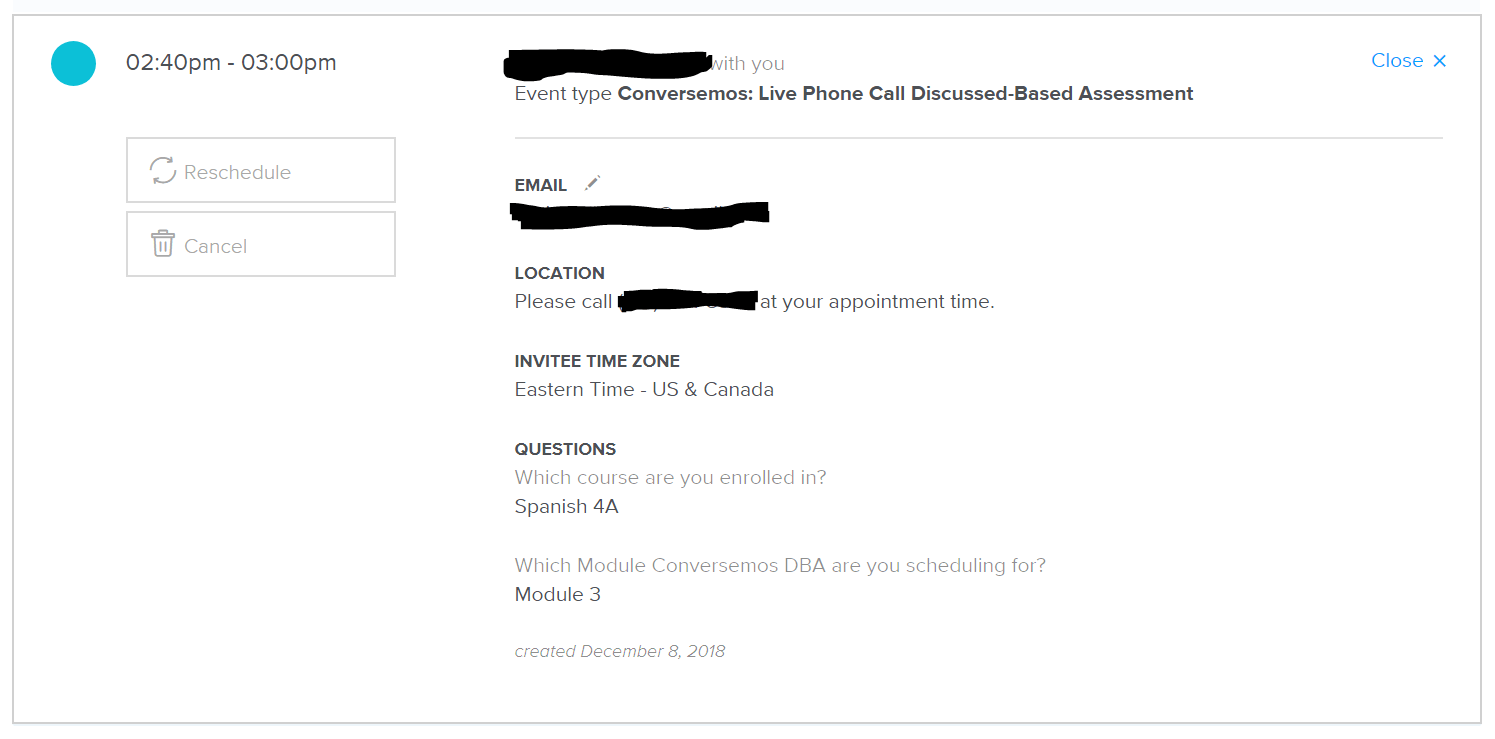
Having this information in our Outlook calendar event — as well as in the Calendly dashboard — helps us quickly prepare for each appointment. In the event that a student needs to cancel or reschedule, they can simply access their appointment information from the auto-confirmation email from Calendly to make any changes.Overall, the Calendly site is super user-friendly for both instructors and students and saves us a ton of time when it comes to scheduling! While we teach online, we can see opportunities to use this in a face-to-face classroom in situations where students need to schedule speed conferences with their teacher or when you need to gather a group of students and/or teachers together.
Ultimately, Calendly is a win for us because:
The student must share responsibility for scheduling
The auto syncing/reminder email features make it “hands-off” once you set your availability
The Calendly dashboard is a one-stop shop for adjusting our availability and seeing scheduled appointments and details
The site is super user-friendly for both instructors and students — after full-semester implementation, there was not one complaint regarding the use of this tool or its functionality
While Calendly offers a premium version for purchase, we have found that the free version offers everything we need for creating and managing our large volume of student appointments
How do you use Calendly in your classroom?

Kim Garvison & Alanna Prieditis
¡Hola! We're Kim Garvison and Alanna Prieditis, and we are both full-time online instructors for Michigan Virtual. We teach all levels of Spanish - Level 1 - AP. Kim graduated from Western Michigan University and spent time in Spain traveling across Northern Spain along the Camino de Santiago pilgrimage route. Alanna graduated from Oakland University and studied abroad in Valencia, Spain for a summer.
Related Posts

From Simple Squares to Sweaters: How One Teacher Uses Crochet to Build Confidence
When Erica Gorzen’s students pick up a crochet hook, they choose their own path. Some make simple squares. Others create sweaters and stuffed toys. As the 2026-2027 Regional Teacher of the Year, this Portland High School art teacher shares how choice-based lessons help her students build confidence, independence, and a love of learning that lasts well beyond the classroom.
Build Trust, Boost Autonomy, & Design Smarter Check-Ins With Students
Strong student relationships don't happen by chance. They happen by design. Discover how structured check-ins can build trust, strengthen student autonomy, and help you create more student-centered learning experiences. Plus, access a free template or earn a SCECH while creating a check-in routine for your classroom.
Revisiting the 5:1 Ratio: Reflecting on a "Magic" Ratio Just Too Tidy to be True
A popular idea in education holds that teachers should aim for five positive interactions for every one corrective one. It spread quickly, cited widely, and seemed to just make sense. There was only one problem: the research behind it was never really about teaching at all.

Everyone Has a Story
Learn how one Michigan educator helps students connect with each other and with the power of storytelling. Back when I began teaching...

The Power of the 5:1 Ratio: How Fostering Positive Interactions Can Transform Student Learning
The 5:1 ratio has completely changed my thinking about interactions in the classroom. It all started with a question about grading. After all, part of our jobs as teachers is to provide corrective feedback to help students grow. The 5:1 ratio helps to ensure that students can receive this feedback effectively. More importantly, however, it can help us be intentional about creating a classroom environment that centers our humanity.

Time for Teachers: Self-Assessment with Community Support as Individual Solutions
Educators often cite a lack of time as one of their most significant stressors. How can we help teachers find the balance necessary to feel satisfied in their jobs and meet their social and emotional needs? This third post in the Time for Teachers blog series will discuss the importance of a self-assessment in addressing individual problems and solutions teachers face. This is not to say the onus of addressing challenges should fall squarely on the shoulders of individual teachers. Teachers need a community of practice and support to help them identify problems they might face individually that could benefit from solutions that come from consulting with colleagues.